
From my experience with ClipConverter, it stands out as a straightforward and reliable tool for downloading and converting online videos without the hassle of installing software. Its web-based nature makes it accessible from any device, and the ability to trim videos before download is a practical feature that many overlook. However, users should be mindful of copyright restrictions and the occasional ads on the site, which can be distracting. Overall, if you need a quick, free solution to save videos or extract audio for offline use, ClipConverter delivers effectively.
ClipConverter Video Downloader and Converter Tool for YouTube and More
ClipConverter is a free online tool that lets you download and convert videos from popular streaming sites into various video and audio formats without software installation.
What is ClipConverter?
ClipConverter is a free online media conversion application that allows users to download and convert videos from popular streaming websites. It supports a wide range of video and audio formats, enabling users to save content for offline use or convert media files to formats compatible with their devices.
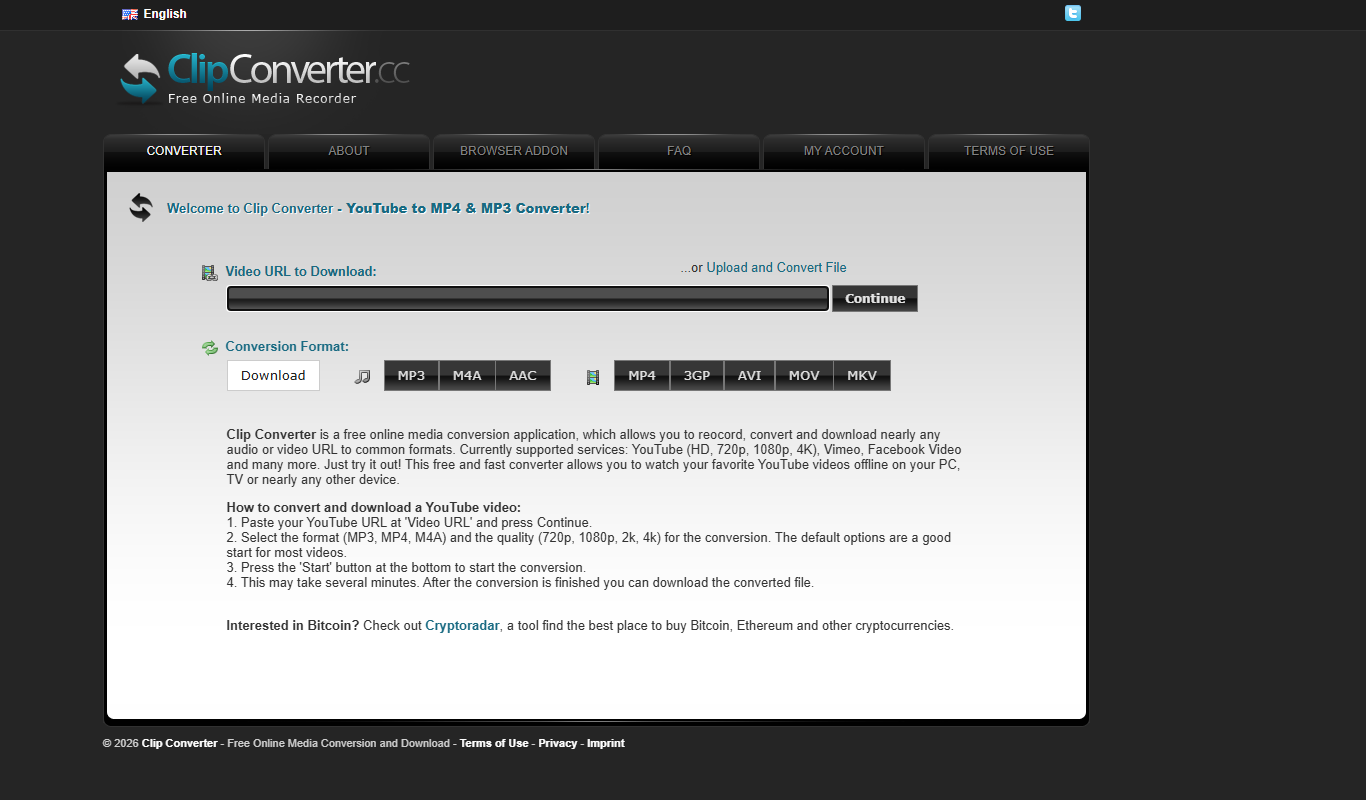
Key Features of ClipConverter
Wide Format Support
Supports conversion to popular video formats like MP4, AVI, MOV and audio formats such as MP3 and M4A.
No Software Installation
Fully web-based tool accessible from any modern browser without downloads.
Video Trimming
Allows users to select specific portions of videos to download.
Multi-Language Interface
Available in multiple languages including English, German, French, Spanish, and Italian.
Free to Use
Completely free service with no subscription or payment required.
Pros and Cons of ClipConverter
Pros
- Supports many video and audio formats
- No installation or registration required
- Simple and intuitive user interface
- Free to use without limitations
- Allows video trimming before download
Cons
- Dependent on source website availability and restrictions
- Occasional ads on the website can be distracting
- No mobile app version available
Key Use Cases for ClipConverter
Download Online Videos
Users can download videos from popular platforms like YouTube, Vimeo, and Dailymotion for offline viewing.
Convert Videos to Multiple Formats
Convert downloaded videos into various formats such as MP4, AVI, MOV, and audio formats like MP3 and M4A.
Extract Audio from Videos
Extract and download audio tracks from video files in formats like MP3 or AAC for music or podcast use.
Create Custom Video Clips
Trim videos by selecting start and end times before downloading to get only the desired segment.
Cross-Platform Accessibility
Accessible via any modern web browser without the need for software installation.
How ClipConverter Works
-
1
Paste Video URL
Enter the URL of the video you want to download from supported websites.
-
2
Select Format and Quality
Choose the desired output format (video or audio) and quality settings.
-
3
Optional Trimming
Set start and end times to download only a specific segment of the video.
-
4
Start Conversion
Click the start button to begin the conversion and download process.
-
5
Download File
Once processed, download the converted file directly to your device.
Who's Using ClipConverter
Casual users wanting offline video access
Content creators needing audio extraction
Educators preparing offline materials
Travelers with limited internet access
Anyone needing quick video format conversion
ClipConverter Pricing
Free
$0
Access to all features without any cost or registration.
Frequently Asked Questions About ClipConverter
ClipConverter is a tool for personal use to download and convert videos. Users should ensure they comply with copyright laws and terms of service of the source websites.
It supports popular video platforms such as YouTube, Vimeo, Dailymotion, and others.
No, ClipConverter is entirely web-based and works through your browser.
Yes, you can extract audio from videos and download it in formats like MP3 or M4A.
It depends on your specific needs and how you plan to use the tool. The official website and documentation are the best sources for the latest details.
Yes, it can help with that use case depending on how you configure it and what features are available. You’ll get the best results with clear inputs and a defined goal.
It depends on your specific needs and how you plan to use the tool. The official website and documentation are the best sources for the latest details.
Share your review
Reviews are limited to one per logged-in user and are published after moderation.
You need an account to review this tool.
0.0
★
★
★
★
★
0 reviews
5 star
0
4 star
0
3 star
0
2 star
0
1 star
0
No reviews yet
Be the first to share how this tool worked for you.
Questions from the community
Read questions and answers about this tool, or ask your own.
No questions yet
Start the conversation by asking the first question about this tool.
Is this tool helpful?
Alternative Tools
Explore similar AI tools that might fit your needs

Free
Y2Mate
Y2Mate is a free online tool that allows users to download videos from YouTube and other platforms and convert them into various formats including MP3 audio.

Free
SaveFrom.net
SaveFrom.net is a free online tool that lets you download videos and audio from popular websites like YouTube, Facebook, and Instagram without registration.

Enterprise
Label Studio
Label Studio is an open source data labeling tool by Heartex that supports multi-modal annotation for machine learning datasets with customizable interfaces and API integration.

Free Trial
Sonix
Sonix is an AI transcription software that automatically converts audio and video files into accurate, editable text transcripts supporting multiple languages and offering features like speaker labeling and export options.

Free
Soundation
Soundation is a browser-based music production platform that enables users to create, edit, and collaborate on music projects with virtual instruments, loops, and real-time collaboration features.

Free Trial
Acon Digital DeNoise
Acon Digital DeNoise is a professional audio noise reduction tool that removes unwanted background noise from recordings using adaptive algorithms, available as standalone software and plugins for Windows and macOS.

Free
SongBPM
SongBPM is a free web tool that allows users to find the beats per minute (BPM) of songs by searching its extensive database, helping DJs, producers, and music fans identify song tempos quickly and accurately.

Free
TuneIn Radio
TuneIn Radio is a streaming platform providing access to live radio stations, podcasts, music, and news globally, available on web, mobile, and smart devices with free and premium options.

Free
MP3Juice
MP3Juice is a free web-based tool that lets you convert YouTube videos to MP3 audio files and download them without registration.

Freemium
Splice
Splice is a cloud-based music production platform that provides royalty-free samples, cloud backup, collaboration tools, and plugin rentals to streamline music creation.